Training TTS on Free Kaggle T4 GPUs vs an RTX 3050
A small voice model (about 24 million parameters, covered in Vietnamese TTS on a low-end PC) needs a few hundred thousand training steps. A weak machine with no GPU cannot do it. An RTX 3050 6 GB can, but it is tight. The third option is Kaggle’s free GPUs, with a quota of 30 GPU hours per week and up to 11.3 hours per session. This post records the real speed of both options and the places where things went wrong.
How it was measured
The two sides ran two close variants of the same model family (original VITS on the RTX 3050, MB-iSTFT-VITS on Kaggle) with the same kind of Vietnamese sentence data. The metrics:
- Seconds per step (one step is one batch of sentences going through the model, generator and discriminator both included, as in a GAN).
- Sentences per second: batch size divided by seconds per step.
- Peak VRAM when training on real data (sentences 1–18 seconds long).
On Kaggle, the kernel used 2 T4 GPUs with DDP and fp16. On the RTX 3050, training ran on a single GPU.
Results
| Setup | Batch | Seconds per step | Sentences per second | VRAM per GPU |
|---|---|---|---|---|
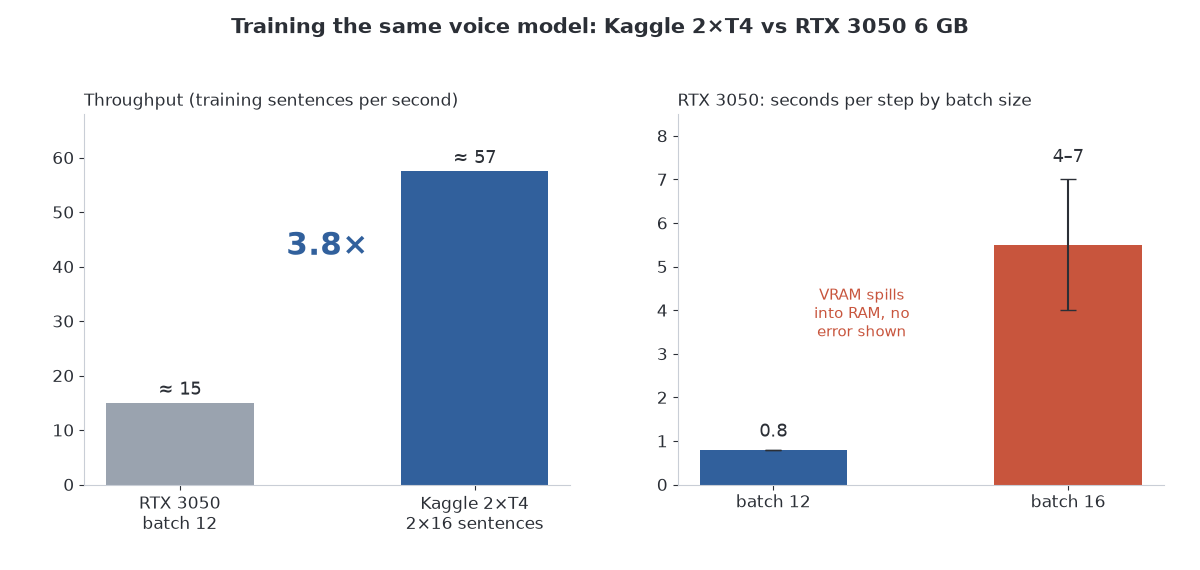
| RTX 3050 6 GB | 12 | about 0.8 | about 15 | fits |
| RTX 3050 6 GB | 16 | 4–7 | about 2–4 | 6.9 GB (over 6 GB) |
| Kaggle 2×T4, fp16 DDP (quick test) | 2×16 | 0.556 | about 57 | 4.3 GB |
| Kaggle 2×T4, real data, first session | 2×16 | 0.585 | about 55 | 6.38 GB |
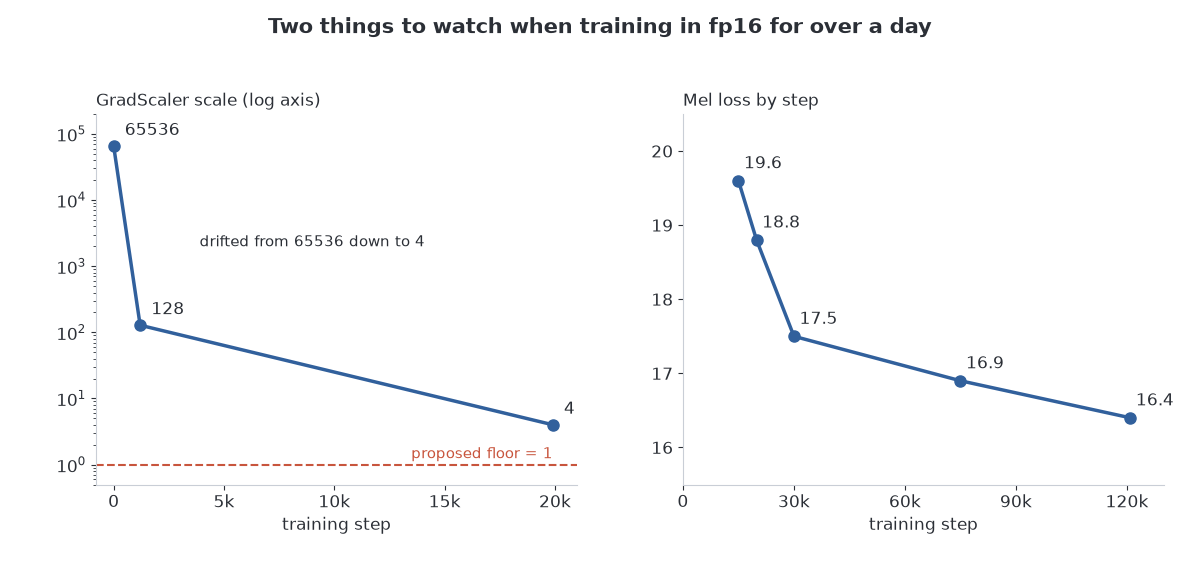
Kaggle 2×T4 delivers about 3.8 times the throughput of the RTX 3050 at batch 12. One 11.3-hour session runs about 72,000 steps, equal to 250 epochs over 9,000 sentences. In practice, mel loss fell from 19.6 (15,000 steps) to 16.4 (120,000 steps, after two sessions) and then flattened.
The traps
1. A kernel with the GPU switched on runs on CPU, with no error. A kernel pushed with the T4 option still ran on a +cpu PyTorch build, even with the full 30-hour quota left. The suspected cause was an account that had not completed verification. After verifying, Kaggle assigned 2 T4 GPUs. The cheapest safeguard: print torch.cuda.is_available() on the first line of the kernel.
2. The fp16 GradScaler drifts downward. In a GAN, gradients occasionally overflow to inf for real, and the scale is halved. By default it takes 2,000 clean steps in a row to double again, so the scale fell from 65,536 to 128 (step 1,200) and then to 4 (step 19,900), with 20 skipped steps. Below 1, fp16 gradients underflow. The fix: set growth_interval to 500 and clamp the scale at a floor of 1.
3. RTX 3050: batch 16 overflows VRAM without an OOM error. Batch 16 needs 6.9 GB. On Windows the card falls back to system RAM, so nothing fails, but each step takes 4–7 seconds, about 5–9 times slower than batch 12. Also, cudnn.benchmark should be off when batch lengths keep changing, because every new shape triggers a fresh algorithm search.
4. The quick test underestimates VRAM. A short test with short sentences used 4.3 GB; real data used 6.38 GB at the same batch 16. Batch 24 is estimated at 9.5 GB and batch 32 at 12 GB (close to the 15 GB limit), so batch 24 per GPU was chosen. The last two figures are estimates, not measurements.
5. A checkpoint passed between sessions through a dataset can be a stale copy. The end-of-session checkpoint is uploaded as a Kaggle dataset for the next session to load. The last session got an old dataset version even though its status said ready. As a result, that session loaded the checkpoint from step 120,900 instead of the newer one from the previous session, repeated work already done, and wasted a full 11-hour session. The fix: the kernel takes an expected step count and exits if the checkpoint is older, plus a 15-minute wait after upload.
Takeaway
Free GPUs are enough to train a voice model of about 24 million parameters, but the time is eaten mostly by silent failures (running on CPU, drifting scale, stale checkpoint), not by compute speed. None of them raise an error: the log keeps scrolling, and only the result is wrong or slow. Printing environment info at the top of the kernel and checking the checkpoint step on load saves more hours than any optimization.
Limits of the measurement
- Each setup was measured once (one Kaggle session, one trial on the RTX 3050), without repeats. T4 speed on Kaggle can vary over time.
- The 3.8× ratio compares sentences per second across two model variants and two batch sizes (32 versus 12 sentences). It is not a like-for-like comparison. The 15 sentences per second for the RTX 3050 is 12 sentences divided by 0.8 s.
- The 4–7 seconds per step for batch 16 on the RTX 3050 is a rough observed range, with no repeated measurement.
- VRAM for batch 24 and 32 is estimated. Kaggle’s 30-hour quota and session limits can change with its policy.
- Mel loss is not listening quality. Voice quality is covered separately in automatic metrics cannot catch a “robotic” voice.
Try it
A model trained this way runs in the browser: try the Vietnamese text to speech tool (your text never leaves your device).
- CER, UTMOS and DNSMOS Can't Catch a Robotic TTS VoiceA Vietnamese TTS model had 0.89% CER, level with the large model, yet sounded robotic. Why CER, UTMOS and DNSMOS miss rhythm, and the use_sdp culprit.
- Vietnamese TTS on a Low-End 4-Core PC, No GPU6 Vietnamese text-to-speech models timed on a low-end 4-core PC with no GPU: which keep up in real time, which need a GPU, and a 35 MB winner.