Running Claude Code 24/7 on an 8 GB Mini PC: Real Numbers
Claude Code is a coding assistant that runs in a terminal. To let it work for long stretches without anyone at the keyboard, a mini PC was left running day and night and given tasks through Telegram messages from a phone. Two questions needed numbers: does a 6 W machine with 8 GB of RAM hold up, and how many API calls and tokens does a typical day use?
The system under test
A self-written Telegram bridge (about 1,850 lines of Python) receives each message and runs Claude Code non-interactively in the matching project folder, resuming the previous session with --resume. Every project has its own chat “lane”, several lanes run in parallel, and the number of processes is not capped. A small monitor samples RAM, swap, CPU, temperature and disk once a minute and raises an alert above set thresholds.
How it was measured
- Tokens and calls: Claude Code writes every API call, with its token counts, to a session log. A script read all logs (sub-agents included), removed duplicates by message id and summed by day.
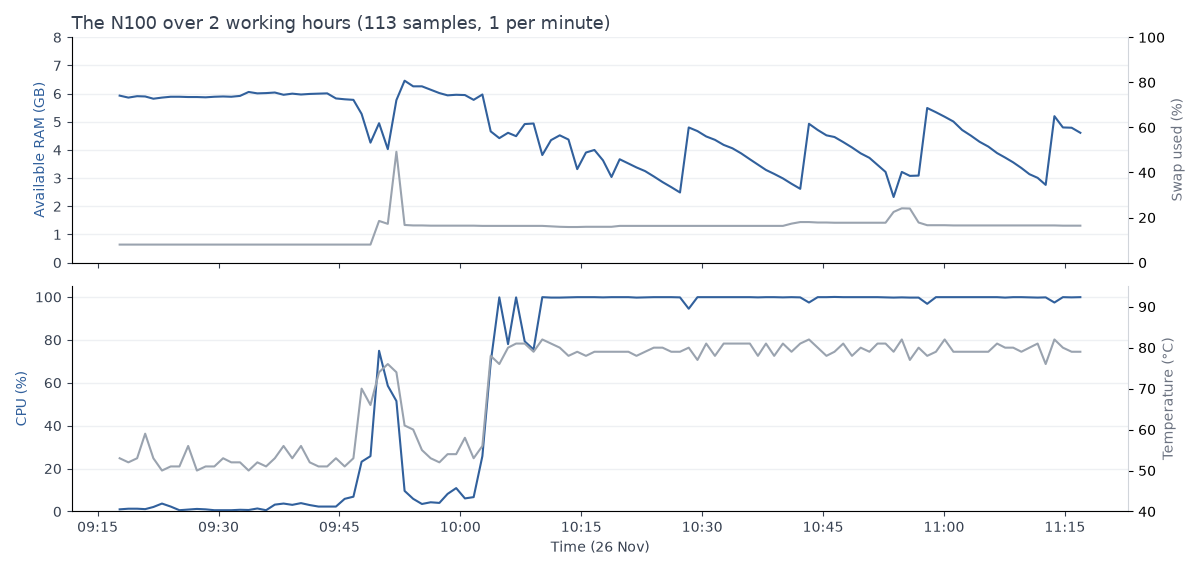
- Machine resources: 113 monitor samples, one per minute, during a working window of 09:17–11:16 on 26 Nov.
Calls and tokens
| Metric | Value |
|---|---|
| API calls | 5,526 (about 395 per active day) |
| Sub-agent calls (smaller model) | 1,450, or 26% |
| Tokens read from cache | 434.3 million (96.8% of all input tokens) |
| Tokens written to cache | 14.5 million (3.2%) |
| Input tokens not served by cache | 11,974 (0.003%) |
| Output tokens | 4.94 million |
| Average per call | about 78,600 cache-read tokens, 894 output tokens |
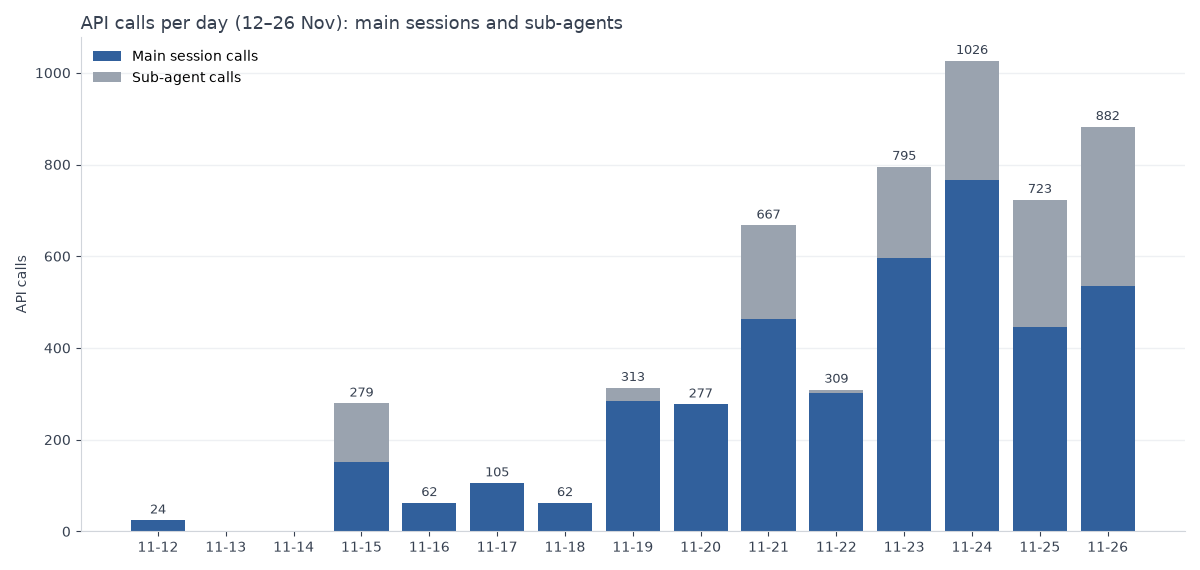
Summary log (columns: date, calls, of which sub-agent, million cache-read tokens, million cache-write tokens, uncached input tokens, thousand output tokens):
2026-11-15   279  128   31.0  0.9   566   311
2026-11-16    62    0    3.6  0.1   124    27
2026-11-17   105    0    9.0  0.4   212    61
2026-11-18    62    0    3.9  0.2   126    66
2026-11-19   313   29   21.9  0.8   684   234
2026-11-20   277    0   18.7  0.4   600   167
2026-11-21   667  204   45.5  2.5  1458  1237
2026-11-22   309    8   13.6  0.6   706   159
2026-11-23   795  198   55.8  1.6  1780   600
2026-11-24  1026  260   98.8  2.4  2192   660
2026-11-25   723  277   52.9  1.8  1556   650
2026-11-26   882  346   77.9  2.4  1912   742
TOTAL       5526 1450  434.3 14.5 11974  4941
The sub-agent share ranges from 0% to 39% per day, depending on the amount and kind of work. From 23 Nov onwards, every day had 25–39% of its calls coming from sub-agents.
Keeping the cache warm with hidden pings
Almost all input is context repeated between turns, which is why 97% comes from cache. The cache only lives for a limited time (1 hour in the configuration used). After that, the next turn has to write the whole context again. The bridge applies four rules:
- A lane with a background job or a plan waiting for approval, idle for more than 50 minutes: send a hidden “ping” asking for a one-line reply, meant to refresh the cache.
- A lane that finished its work and has been idle for 50 minutes: close the process, keep the session so it can be resumed.
- Cache already cold and context at 30,000 tokens or more: hold the new message and ask first, to avoid an unexpectedly expensive first call.
- A plan waiting for approval for more than 2 hours: close it, never approve it automatically.
No controlled comparison with and without pings was run, so the saving is unknown. The 97% figure shows that the cache works. It does not prove the pings are responsible.
RAM, heat and swap
| Metric (113 samples) | Min | Average | Max |
|---|---|---|---|
| Available RAM | 2.3 GB | 4.7 GB | 6.5 GB |
| Swap used | 8% | 15% | 49% |
| CPU | 1% | 64% | 100% |
| 5-minute load (4-core machine) | 0.03 | 2.8 | 5.4 |
| Temperature | 50 °C | 70 °C | 82 °C |
Each claude process takes roughly 125–330 MB of RAM; five were open during the measurement. The machine had been up for 14 days 13 hours without a restart. From about 10:05 the CPU sat near 100% for over an hour while the machine stayed responsive, with temperature holding at 76–82 °C. Available RAM shows a sawtooth, falling from about 5 GB to 2.5 GB and recovering; the cause of each cycle was not recorded.
What a small machine can and cannot do
- Can: run several Claude sessions in parallel (the reasoning happens on the provider’s servers; the machine only runs the coordinating processes), build a website, run a few-minute scheduled job every morning (see the post on an AI agent doing daily SEO), and run small voice models on the CPU.
- Cannot: GPU work such as model training, or large models (see the TTS benchmark on a weak PC: 10–40 times slower than real time). Those jobs move to a free Kaggle T4 GPU or a PC with an RTX 3050 6 GB.
- Practical ceiling: several heavy jobs at once push swap to nearly half; 8 GB of RAM is the main limit, the 4 CPU cores the second.
Limits of the measurement
- One machine, one user, 14 days. The call count follows the workload of each day (from 0 to 1,026 calls).
- The resource chart covers only 2 hours (the monitor keeps 2 hours of history) and falls in a heavy working period, so it is not a 24/7 average.
- The sub-agent share is by call count, not by tokens. De-duplication by message id may miss or double-count a few calls.
- No money figure: Claude Code is used through a subscription login, not pay-per-token API billing. Anyone running it unattended around the clock should check the terms of their own plan first.
- No control experiment for the cache pings.
Further reading
An example of a scheduled job running on this machine: an AI agent doing SEO every morning. Voice-model numbers from the same machine: Vietnamese TTS on a low-end 4-core PC.