AI Livestream Host on Weak Hardware: CPU or GPU per Step
Ads for “24/7 AI livestream” services are becoming common: a virtual host stands behind a counter, presents products and answers comments. A close look at one such ad shows the host repeating a few hand gestures and never touching the products. Most of the footage is pre-rendered clips played in a loop, combined with a synthetic voice and a program that matches keywords in comments to pre-recorded answers.
Rebuilding that setup takes three compute-heavy steps: removing the background from product photos, generating the host and set image, and lip-syncing the host to the voice. This post times each step on three configurations: a mainstream 6 GB GPU, a 12-thread CPU, and an 8 GB mini PC without a GPU, to see which steps work on weak hardware. Sales performance is not evaluated. AI-generated content on TikTok and Facebook must carry an AI label under platform rules.
Method
- Every input image was generated with Z-Image; no third-party images were used. Each step includes easy and hard cases.
- Background removal: the rembg library with two models, u2net (light) and BiRefNet-lite (cleaner edges). Seconds per image after one warm-up run.
- Image generation: Z-Image-Turbo compressed as GGUF Q4 (3.9 GB) plus the Qwen3-4B Q4 text encoder (2.5 GB), run with stable-diffusion.cpp, 8 steps. Total wall time from launch to image, including model loading, and peak process RAM.
- Lip-sync: MuseTalk v1.5, fp16. Preprocessing (face detection, landmarks), frame generation and blending were timed separately.
- The N100 mini PC was measured only for background removal. The other two steps were judged against the RAM they needed on the desktop.
Overview
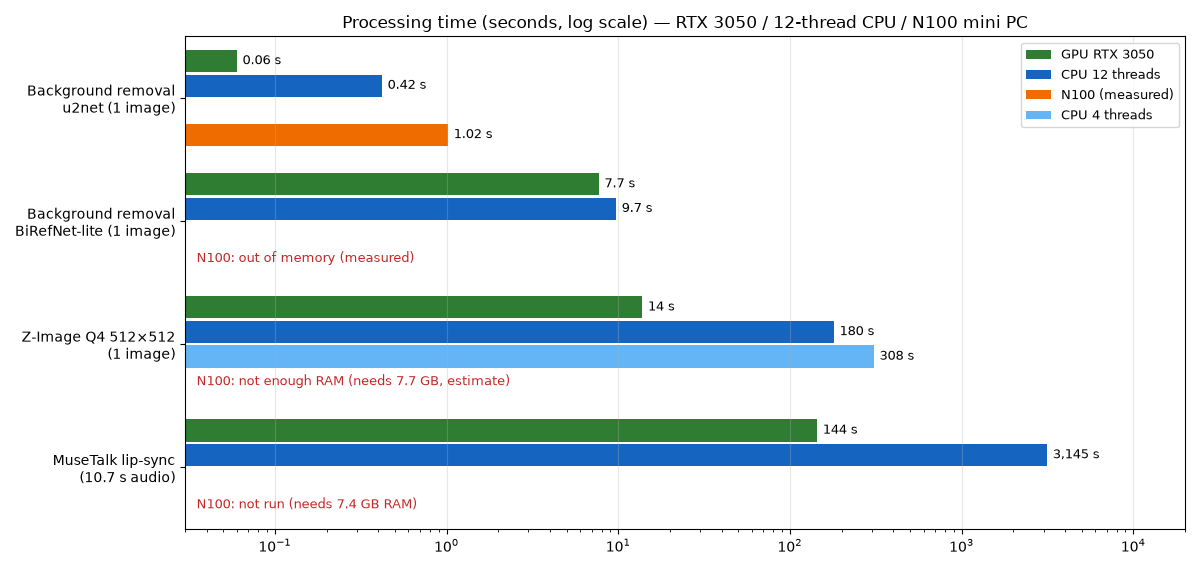
The GPU advantage differs a lot by step: 7× for u2net, 13× for image generation, 22× for lip-sync. On the 8 GB mini PC the limit is RAM, not speed.
Demo video: the three steps combined
- Input: one prompt describing the host, two 7-second Vietnamese voice files (normal pace and fast), and a cream backdrop with a cut-out kettle placed on it.
- Output: a 17-second vertical clip. The first 3 seconds show the original Z-Image host image. The remaining 14 seconds show the host lip-synced to both voice files, cut out from the kitchen and placed on the new backdrop.
- Time on an RTX 3050: host image 46 s, lip-sync about 2 minutes per 7-second line, per-frame u2net cut-out 110 ms/frame (9 fps, including reading, compositing and writing frames), a few seconds of encoding.
At 9 fps, per-frame background removal is short of the 25 fps needed for real time, but more than enough to pre-render clips for playback.
Product background removal: 5 cases
- Input: five 1024×1024 images generated by Z-Image, ordered from easy to hard (prompts in the table).
- Output: PNG with an alpha channel. In the figure the left column is the input, the middle is u2net, the right is BiRefNet-lite; removed areas show as a checkerboard.
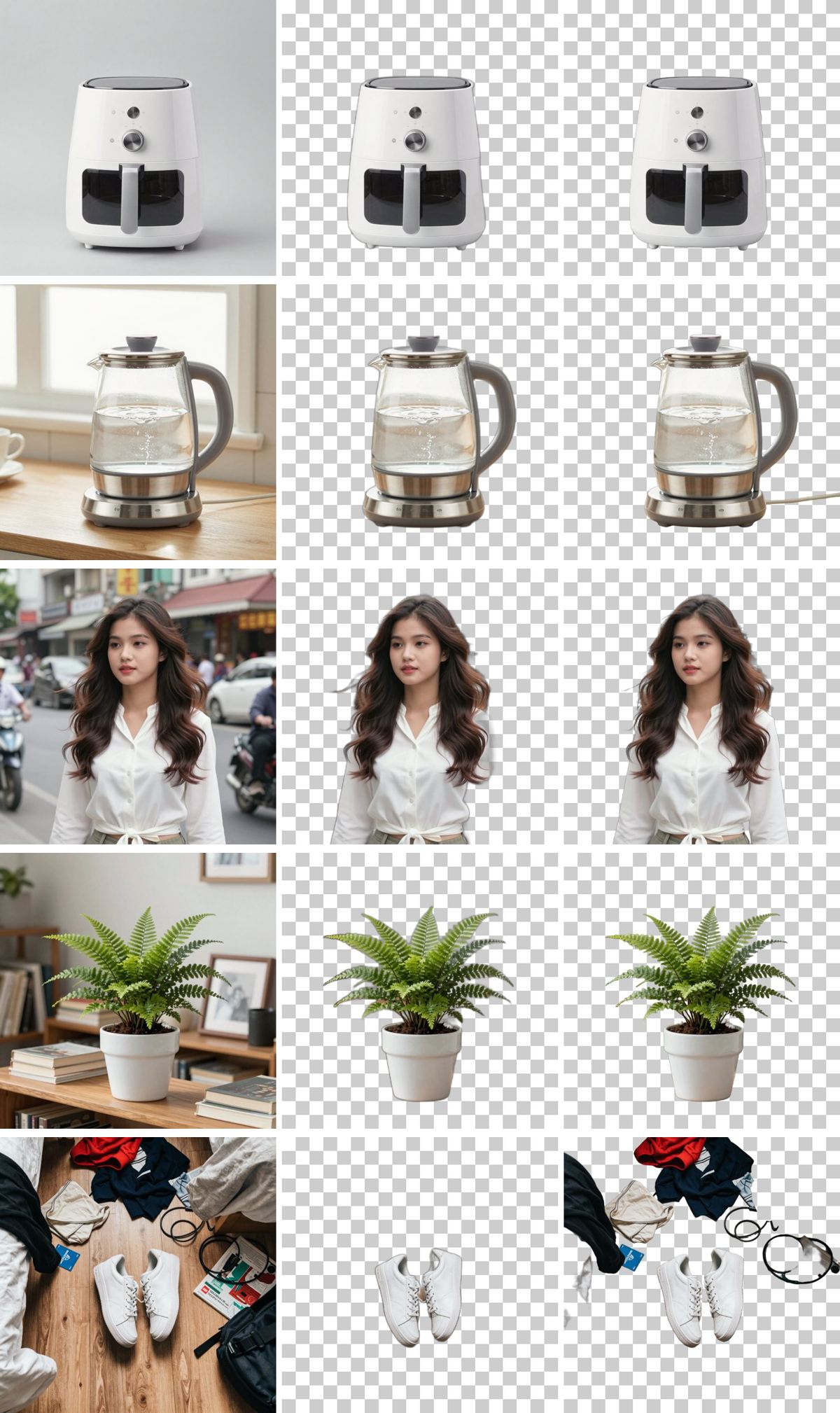
| # | Input (short prompt) | u2net GPU / CPU | BiRefNet GPU / CPU | Notes |
|---|---|---|---|---|
| 1 | White air fryer, plain grey background | 0.07 / 0.49 s | 8.5 / 9.4 s | Both clean. |
| 2 | Transparent glass kettle with water, wooden counter by a window | 0.07 / 0.41 s | 5.7 / 8.6 s | Both treat the glass as solid: the window behind stays inside the kettle. BiRefNet keeps the power cord, u2net drops it. |
| 3 | Woman with long windblown hair, busy street | 0.07 / 0.43 s | 5.6 / 8.7 s | Both keep the whole person. u2net leaves a soft halo around the hair. |
| 4 | Fern with thin fronds, cluttered living room | 0.07 / 0.41 s | 5.6 / 8.6 s | u2net leaves a grey halo around the leaves. BiRefNet cuts each frond sharply. |
| 5 | White sneakers on a messy bedroom floor | 0.07 / 0.41 s | 5.5 / 8.9 s | u2net keeps only the shoes, as intended. BiRefNet also keeps clothes, cables and a wallet. |
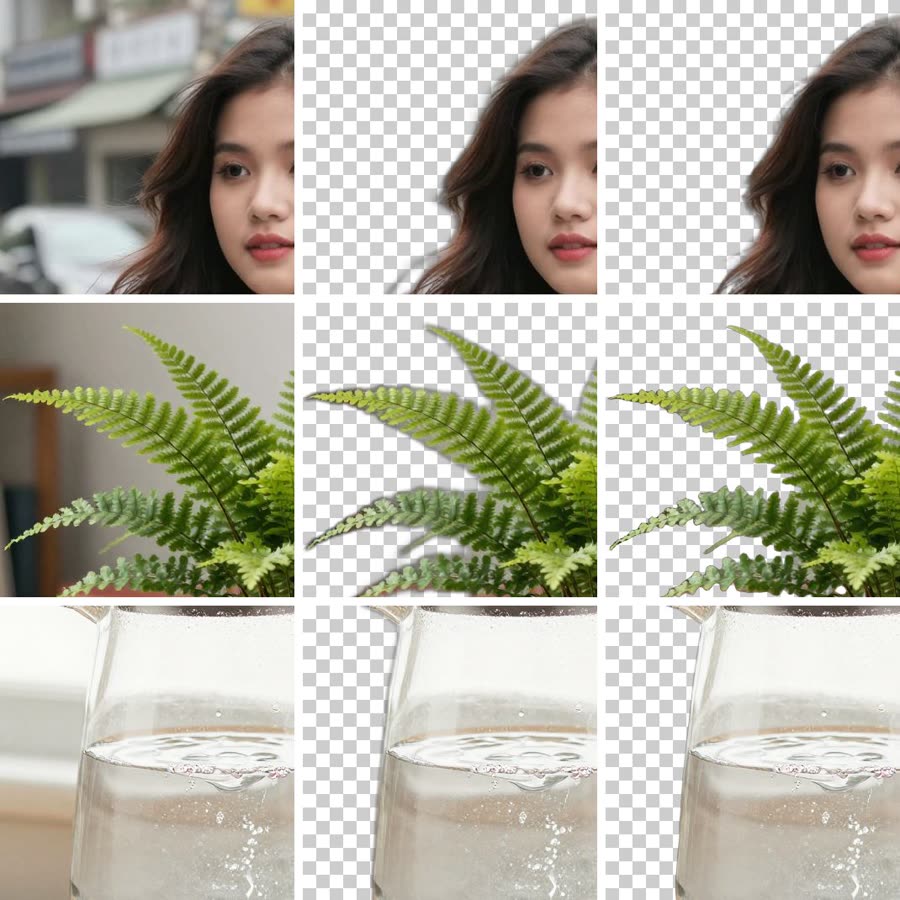
The close-ups make the difference clear: u2net leaves a soft halo around hair and leaves, BiRefNet-lite cuts sharply. In exchange BiRefNet is greedier: in image 5 it keeps the clutter around the shoes. Neither model handles transparent objects: the mask is solid, so the kettle still carries the old window and gives itself away on a new backdrop.
Earlier run on the N100 mini PC: u2net 1.02 s per image, about 3,500 images per hour. BiRefNet-lite needs almost 7 GB of RAM for a 1024 px image, so the 8 GB mini PC ran out of memory.
N100  u2net cpu {'load': 0.7, 'per_img': 1.02, 'max': 1.05}
N100  birefnet-general-lite cpu -> Out of memory: Killed process (python) anon-rss:6979680kB
PC    r5_giay_san_lon_xon u2net gpu 0.07   birefnet-general-lite gpu 5.52   cpu 8.85
Hard case: ad-style product images
The Z-Image shots above are fairly clean. Real seller photos on marketplaces are often ad graphics: large text, icons, inset photos, voucher badges, kitchen backdrops. This case uses the 9 images (1024×1024) of a non-stick frying pan listing. The 4 hardest were picked, and isnet-general-use and BiRefNet-general (full) were added. The shop name on the cover image is blurred.
- Input: a cover with heavy text and a voucher badge, a size chart with 3 inset photos below, a “deep pan” shot on a kitchen counter, and a shot with a 3-layer diagram touching the pan body.
- Output: transparent PNG on a checkerboard. The last column is BiRefNet-lite plus one post-processing step: keep only the largest connected region of the mask (dilated by 6 px), then crop tight.
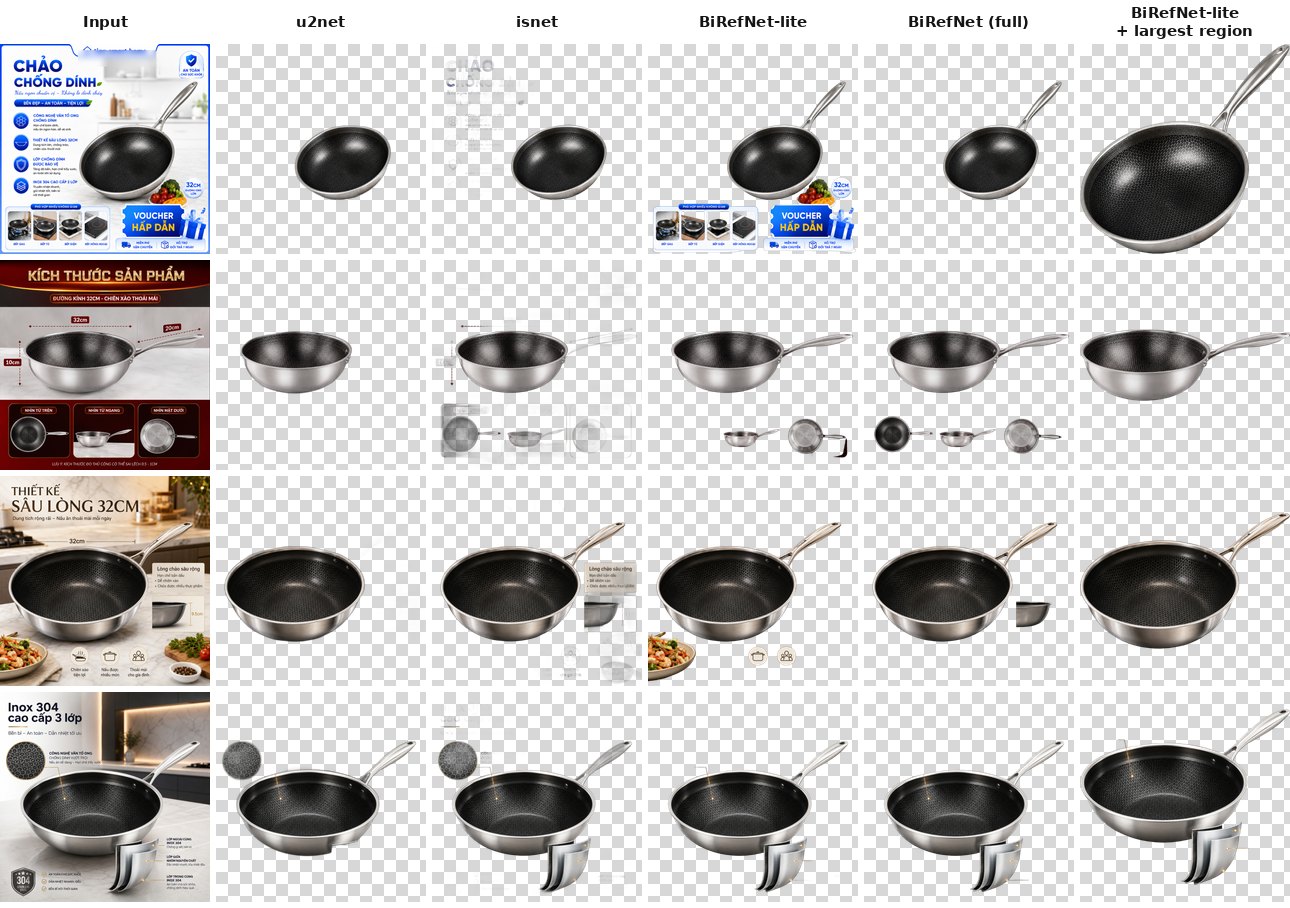
| # | Input | isnet / BiRefNet-lite / BiRefNet full (GPU) | Notes |
|---|---|---|---|
| 1 | Cover: large text, 4 icons, 4 insets, voucher | 1.2 / 7.9 / 23.7 s | u2net and isnet lose the handle; isnet leaves ghost text. BiRefNet keeps the handle; lite also keeps the voucher and insets. |
| 2 | Size chart, 3 insets below | 0.2 / 7.2 / 12.0 s | u2net loses the handle. BiRefNet keeps all 3 insets. |
| 3 | Pan on a counter with a food plate and a callout box | 1.1 / 6.4 / 11.6 s | u2net loses the handle. BiRefNet-lite keeps the plate, full keeps the callout. |
| 4 | Pan with a 3-layer diagram touching its body | 1.1 / 6.0 / 11.0 s | All 4 models keep the diagram. “Largest region” cannot remove it because it is connected to the pan. |
The result is the opposite of the 5 images above. u2net is fast but drops the handle in 3 of 4 images: the thin, bright steel handle is treated as background, which is easy to miss when a product card only shows the pan bowl. BiRefNet keeps the handle but also keeps text, vouchers and insets. Adding the largest-region step makes 3 of 4 images clean, and with it BiRefNet-lite (6–8 s) is close to the full model (11–12 s) at nearly twice the speed. Image 4 still fails: separating a touching object needs prompt-based segmentation (e.g. “frying pan”), or picking another image from the listing.
PC  1 birefnet-general 23.7   (first image after warm-up; the rest 11.0–12.8)
PC  4 birefnet-general 11.01  4 birefnet-general-lite 6.03  4 isnet-general-use 1.07
PC  all 9 images: isnet 0.23–1.18 s, BiRefNet-lite 6.03–7.88 s, BiRefNet full 11.0–12.8 s
Image generation with compressed Z-Image-Turbo: 4 cases
- Input: one English prompt, seed 42, 8 steps.
- Output: one PNG. From left: serum bottle on white, host image 720×1280, hands holding a handheld blender, noodle pack with Vietnamese text.

| # | Prompt | Size | Time (GPU) | Result |
|---|---|---|---|---|
| 1 | Product photo of an amber glass skincare serum bottle with a dropper cap on a pure white background, soft shadow, studio lighting |
1024×1024 | 46 s | Matches the prompt, usable as is. |
| 2 | Photorealistic livestream frame, young Vietnamese woman host in a white blazer, friendly smile, waist-up behind a white marble counter with a white air fryer, bright modern kitchen showroom, soft studio lighting |
720×1280 | 46 s | Matches the prompt. This image is the lip-sync input. |
| 3 | Close-up photo of a woman's hands holding a small white handheld blender toward the camera, fingers clearly visible, kitchen background, natural light |
1024×1024 | 46 s | Both hands have the right number of fingers and natural joints. One seed only, so no error rate. |
| 4 | ... large bold white text 'MÌ TÔM CHUA CAY' and smaller text 'Hương vị Việt' ... |
1024×1024 | 44 s | Large letters have the right shapes but wrong diacritics: “MÌ TÒM CHÙA CAY”. Small text is garbled. |
Takeaway: products, people and hands are usable, but Vietnamese text with diacritics is not reliable. Text on packaging or price boards should be added afterwards in a graphics editor.
Speed by configuration (earlier run, host image):
| Configuration | Time per image | Peak RAM |
|---|---|---|
| GPU, 512×512 | 13–15 s | 6.6 GB |
| GPU, 720×1280 (vertical livestream frame) | 46 s | 6.7 GB |
| GPU, 1024×1024 | 51 s | 6.7 GB |
| CPU 12 threads, 512×512 | 180 s | 7.7 GB |
| CPU 4 threads, 512×512 | 308 s | 7.7 GB |
| CPU 12 threads, 1024×1024 | 968 s (overlapped, see limitations) | 10.4 GB |
On a 6 GB GPU the model and text encoder do not fit in VRAM together, so --offload-to-cpu is required: most of the 42-second sampling at 1024 px is spent copying weights back and forth. On CPU a 512 px image takes 3–5 minutes. The 8 GB mini PC has no room for the 7.7 GB the process needs.
gpu_512_b     total=12.8s  peakRAM=6.62GB
gpu_1024      total=50.9s  peakRAM=6.65GB   sampling completed, taking 42.46s
cpu12_512     total=180.3s peakRAM=7.68GB   sampling completed, taking 161.20s
z4_chu_tieng_viet 1024x1024 total=43.7s exit=0
Lip-sync with MuseTalk: 4 cases
- Input: one still 720×1280 host image generated by Z-Image (looped into a 7.5-second clip) and one 7-second Vietnamese voice file.
- Output: an mp4 of the same size, with audio, where the host’s mouth follows the voice. The video below joins the 4 cases; the number in the top-left corner is the case number.
| # | Case | Total time (GPU) | Notes |
|---|---|---|---|
| 1 | Facing the camera, normal pace | 115 s | Mouth matches the sounds, face identity preserved. |
| 2 | Head turned about 30° | 111 s | Still lip-syncs. Cheek and chin look smoother than the rest of the face. |
| 3 | Microphone held at the chin | 111 s | Mouth moves, but the top of the microphone falls inside the regenerated area and gets warped and blurred. |
| 4 | Facing the camera, fast speech | 108 s | Mouth keeps up with the pace, no visible lag. |

Each 7-second clip (175 frames) took about 2 minutes on the RTX 3050: preprocessing (face detection, landmarks) 57 s, frame generation 26–29 s (6.0–6.8 fps), blending into the original 21–23 s, model loading 8–9 s. Peak VRAM 5.8–5.9 GB of 6 GB.
m1_nhin_thang  frames=175 preprocess_s=58.6 gen_s=29.0 blend_s=22.7 task_total_s=115.2 peak_gpu_used_mib=5894
m3_cam_micro   frames=175 preprocess_s=57.1 gen_s=28.7 blend_s=20.9 task_total_s=111.0 peak_gpu_used_mib=5841
m4_noi_nhanh   frames=178 preprocess_s=56.7 gen_s=26.1 blend_s=21.5 task_total_s=108.2 peak_gpu_used_mib=5847
Compared with CPU (earlier run, 590×620 face clip, 10.7 s of audio):
| Step | GPU RTX 3050, fp16 | CPU 12 threads, fp32 |
|---|---|---|
| Preprocessing: face detection, landmarks, encoding | 78 s | 2,164 s |
| Frame generation | 39 s (6.8 fps) | 916 s (0.29 fps) |
| Blending into the original | 23 s | 60 s |
| Total | 144 s | 3,145 s (52 min) |
| Peak memory | VRAM 5.94 GB, RAM 3.8 GB | RAM 7.4 GB |
Two surprises. First, on CPU the most expensive part is preprocessing (36 of 52 minutes), not frame generation. In principle it only needs to run once per host image: with it cached, each new line on GPU would take about 50 seconds (estimated from generation + blending; caching mode was not measured). Second, a 6 GB card must use fp16: fp32 overflows VRAM and took 882 seconds.
Limitations
- Each case ran once with one seed, no averaging. Image quality, cut-out edges and lip-sync were judged by eye.
- The 4 MuseTalk cases used a 720×1280 still image. The GPU/CPU comparison table comes from the earlier run with a 590×620 face clip, so the two sets of numbers are not directly comparable.
- The CPU MuseTalk run partly overlapped the CPU Z-Image run, so 52 minutes is an upper bound. The 1024 px CPU Z-Image run also overlapped.
- BiRefNet-lite on GPU is only slightly faster than CPU (5.5–8.5 s vs 8.6–9.4 s). This may be an onnxruntime configuration issue; not investigated further.
- The demo video removes the background frame by frame independently; edge flicker between frames was not measured.
- The N100 mini PC was measured only for background removal. The other two steps were judged “not runnable” from the RAM measured on the desktop (7.4–7.7 GB vs the mini PC’s 8 GB, about 1 GB of which the OS already uses); smaller quantizations were not tried.
- The ad-style case covers one product only (4 of its 9 images), GPU only. The “largest region” step is custom post-processing, not built into rembg.
Conclusion
- A weak PC without a GPU can handle: u2net background removal, video compositing, and playing scripted clips.
- Pick the cut-out model by image: BiRefNet-lite gives sharper hair and leaf edges but keeps clutter in messy scenes; u2net is about 80× faster on GPU and suits clean product shots. Neither handles transparent objects.
- Ad-style seller images (text, vouchers, insets): u2net tends to drop thin parts such as handles. Use BiRefNet-lite plus a largest-connected-region step, and prefer the least text-heavy image in the listing.
- Z-Image draws products, people and hands well but gets Vietnamese diacritics wrong. Add packaging text afterwards.
- Lip-sync works well facing the camera or slightly turned. Avoid objects near the mouth such as a microphone.
- Image generation and lip-sync are best pre-rendered on a GPU. A 6 GB card is enough: about 1 minute per vertical host image, about 2 minutes per 7-second line.
A voice for the host can be made with the Vietnamese text to speech tool, which runs in the browser. Voice timings on weak hardware are in Vietnamese TTS on a low-end PC.